~10 minutes
There’s a lot of talk about what AI agents can do: generate REST endpoints in thirty seconds, refactor five hundred lines of legacy code in a single prompt, write unit tests on the fly. What nobody mentions is that this speed is also the speed at which vulnerabilities enter production.
The real problem isn’t the tool — GitHub Copilot, Cursor, Windsurf, Claude, Codex with GPT-42 or any other agent. The problem is that the development pipeline was never designed for this throughput. Specifications stay vague, planning is non-existent, and security review can’t keep pace.
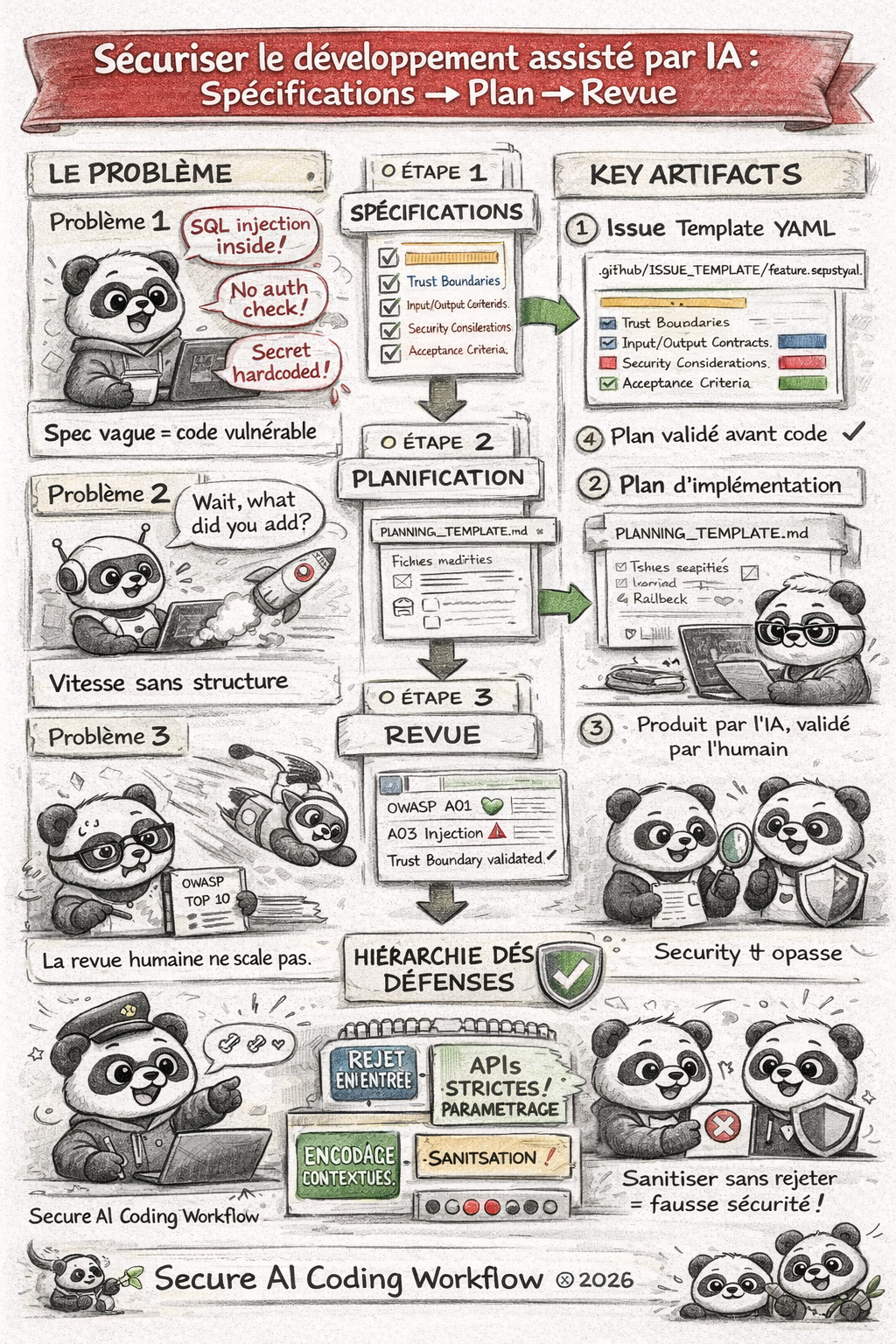
We propose a three-phase approach, generic and adaptable to any pipeline that integrates an AI agent for writing code. Teams can keep using their favourite tools, but we need to impose the structure that prevents AI speed from becoming a security risk.
Humans remain at the heart of development
Humans stay at the centre of the process, but they must be supported by clear artefacts and strict rules so that AI can be a productivity accelerator without becoming a vulnerability accelerator.
We are not proposing to slow AI down; we are proposing to structure what it receives as input and what we verify as output. That is the key to securing AI-assisted development at scale.
We are not AGAINST AI coding agents!
We are AGAINST teams that let them code without a structured framework, without a plan and without rigorous review of their agents and tools.
The real risk: speed without structure
“An AI agent that codes without constraints is a very fast junior developer with no peer review, no spec, no security team — and direct commit access to main.”
Here is what we observe in projects that adopt AI agents without a structured framework:
- GitHub issues are written in two lines (“add login endpoint”) — the agent invents the details, usually badly.
- No implementation plan is produced before code generation — unexpected files get created, dependencies added without oversight.
- Code review stays “human and visual” — nobody systematically maps changes to the OWASP Top 10, for example, and critical findings slip through.
The solution is not to slow AI down. It is to structure what it receives as input and what we verify as output.
Phase 1: Machine-readable specifications
An AI agent generates code based on the context provided to it. If that context is ambiguous, the code will be too. The first step is to make specifications structured and machine-readable — which benefits both the agent and the team.
The issue template with semantic fields
Whether you use GitHub Issues, Jira, GitLab Issues or Linear, the idea is the same: enforce structured fields that capture security information at the moment a requirement is created.
Here is an example GitHub issue template (.github/ISSUE_TEMPLATE/feature_request.yml):
name: "Feature Request"
description: "Feature request — with security criteria"
title: "[FEAT] "
labels: ["feature"]
body:
  - type: textarea
    id: description
    attributes:
      label: "Functional description"
      description: "What should this feature do? Be precise."
    validations:
      required: true

  - type: textarea
    id: acceptance_criteria
    attributes:
      label: "Acceptance criteria"
      description: |
        Given/When/Then format — each criterion must be testable.
        Example:
        - Given: unauthenticated user
        - When: POST /api/resource call
        - Then: 401 response with standardised JSON body
    validations:
      required: true

  - type: textarea
    id: trust_boundaries
    attributes:
      label: "Affected trust boundaries"
      description: |
        List the trust boundaries crossed by this feature.
        E.g.: Internet → API Gateway, API → Database, Service A → Service B
    validations:
      required: true

  - type: textarea
    id: input_output_contracts
    attributes:
      label: "Input / output contracts"
      description: |
        Describe the input data (types, format, origin) and output data.
        Specify the expected validation rules for each field.
    validations:
      required: true

  - type: textarea
    id: security_considerations
    attributes:
      label: "Security considerations"
      description: |
        - Authentication required? (yes/no, mechanism)
        - Sensitive data involved? (PII, financial, health...)
        - Impact on attack surface?
        - Relevant OWASP controls?
    validations:
      required: true

  - type: textarea
    id: testability
    attributes:
      label: "Testability criteria"
      description: |
        How to validate correct behaviour AND security?
        Unit tests, integration tests, fuzzing, DAST planned?
    validations:
      required: true
- Some will say that is a lot of fields to fill in — and that is exactly the point! The more structured information you request, the less the agent has to invent, and the more the generated code will align with your security requirements.
- Some will say the fields are not “typed” and that strict validation is impossible. True — but the goal here is to enforce a semantic structure. Even as free text, the agent can learn to recognise sections and extract key information. That is already a huge step forward compared to an unstructured issue.
What this changes for the AI agent
When the agent receives an issue structured this way, it can:
- Automatically identify the input validations to implement (even without type constraints).
- Respect the defined interface contracts (no guessing).
- Target the security controls specified for the feature.
Without this structure, the agent fills the gaps itself — and it does not necessarily fill them with your security choices.
Enforcing requirements before backlog entry
To allow an issue to enter a sprint or active backlog, we can automate the completeness check. Still following the GitHub example and the elements above, we can create a script that verifies mandatory fields are filled in; if not, it automatically labels the issue needs-security-spec to indicate it must be completed before being processed.
# scripts/validate_issue.py — automation example via GitHub Actions
REQUIRED_FIELDS = [
    "Acceptance criteria",
    "Affected trust boundaries",
    "Input / output contracts",
    "Security considerations",
]

def validate_issue_body(body: str) -> list[str]:
    missing = []
    for field in REQUIRED_FIELDS:
        if field not in body:
            missing.append(field)
    return missing
This script can be triggered on each issue creation/update via webhooks or GitHub Actions, automatically labelling incomplete issues needs-security-spec.
Phase 2: From problem to plan — never write code without architecture
This is the hardest phase to implement culturally, but the most impactful. The AI agent must not write a single line of code before producing a validated implementation plan.
The PLANNING_TEMPLATE
Here is an example implementation plan template that every agent or developer must produce before starting:
# Implementation Plan — [Issue Title]

## Reference
- Issue: #XXX
- Plan author: [AI / Human]
- Date: YYYY-MM-DD

## Scope
This plan covers exactly what is described in the issue. Any out-of-scope
feature must be tracked as a new issue.

## Architecture decisions
- Technical choices retained and justification (no guessing)
- Patterns used (e.g.: repository pattern, validation layers)
- Dependencies added (name, version, reason, licence)

## File-by-file changes
| File | Action | Description |
|------|--------|-------------|
| app/routers/foo.py | Create | POST /api/foo endpoint with validation  |
| app/models/foo.py | Modify | Add field `bar` with constraints (type, length) |
| app/schemas/foo.py | Create | Input/output schemas |
| tests/api/test_foo.py | Create | Unit and integration tests (pytest) |

## Security controls to implement
- [ ] Server-side validation (field X: type, length, format)
- [ ] Authentication/authorisation (chosen mechanism)
- [ ] Error handling without information leakage
- [ ] Logging of sensitive actions

## Test strategy
- Unit tests: edge cases and failure scenarios
- Integration tests: full flows with mocks
- Negative tests: injections, malformed payloads

## Mandatory human review points
- [ ] Architecture validated before code generation
- [ ] Security controls verified after generation
- [ ] Final review before merge

## Rollback
- Are changes reversible? (yes/no)
- Rollback procedure if deployment fails
A generic prompt for any AI agent
Regardless of the tool — Claude, Copilot in agent mode, Cursor, or any other — you can include this rule in your system instructions or workspace configuration files:
Rule: For any feature implementation or bug fix,
you must produce a complete implementation plan using the PLANNING_TEMPLATE
BEFORE writing code. The plan must be validated by a human before continuing.

If the request does not reference an issue with:
- explicit acceptance criteria,
- identified trust boundaries,
- input validation rules,

then ask for this information rather than guessing.

Never generate functionality not described in the reference issue.
Guardrails to stay on track
To prevent the agent from drifting out of scope:
- Contextualise strictly: pass only the relevant issue, not the entire backlog.
- Comment the checklists: “out of scope” sections in the issue prevent completion-by-invention.
- Limit available tools: if your agent can modify system config files, it will — restrict permissions.
- Require justification per change: any file modification not listed in the plan must be explained before being accepted.
- Automate plan validation: use scripts or CI steps to verify the plan is complete and validated before allowing code generation.
- Validate the plan before code: a human must approve the implementation plan before the agent can generate code. No validated plan = no code.
- Mandatory human review: even with a plan, human review remains essential to validate architecture choices and security controls before merge.
- Document decisions: each implementation choice must be justified in the plan to avoid arbitrary agent decisions.
- Track scope changes: if the agent proposes out-of-scope changes, this must trigger an alert and require a new issue to validate those changes.
- Never trust the agent to guess security requirements: if they are not explicitly defined in the issue, they must be requested and validated before any implementation.
- Never trust the agent to guess trust boundaries: if they are not explicitly defined in the issue, they must be requested and validated before any implementation.
- Never trust the agent to guess input/output contracts: if they are not explicitly defined in the issue, they must be requested and validated before any implementation.
- Never trust the agent to guess acceptance criteria: if they are not explicitly defined in the issue, they must be requested and validated before any implementation.
- Never trust the agent to guess testability criteria: if they are not explicitly defined in the issue, they must be requested and validated before any implementation.
- Never trust the agent to guess security considerations: if they are not explicitly defined in the issue, they must be requested and validated before any implementation.
- Never trust the agent to guess dependencies: if they are not explicitly defined in the issue, they must be requested and validated before any implementation.
Absolute rule
NEVER trust the agent to guess functional or security requirements. If they are not explicitly defined in the issue, they must be requested and validated before any implementation.
No validated plan = no code. Full stop.
The agent is a plan executor — not an inventor of features or security controls.
Phase 3: Automated security review of generated code
The agent has produced code. That code has passed functional tests. The most important question remains: is it secure?
The double-pass review
We distinguish two complementary passes:
Pass 1 — Functional correctness:
- Does the code satisfy the acceptance criteria in the issue?
- Are edge cases covered?
- Are input/output contracts honoured?
Pass 2 — Security:
- Is each change mapped to an OWASP Top 10 / CWE category?
- Are the traversed trust boundaries validated?
- Is the defence hierarchy respected?
The minimum defence hierarchy to apply:
- reject at input first (strict type, format and length validation),
- then strict APIs (parameterised queries, ORMs),
- then contextual output encoding,
- and sanitisation only as a last resort.
Any code that starts by sanitising without upstream rejection is a red flag.
The security review prompt
Here is a review prompt template usable with any LLM, or integrable in a pre-commit hook via an API:
# Security Review Prompt

## Context
Security review of the following diff. The reference issue is: [ISSUE_CONTENT]

## What you must analyse

### 1. OWASP Top 10 Mapping
For each significant modification, identify the relevant OWASP category/categories:
- A01 Broken Access Control
- A02 Cryptographic Failures
- A03 Injection (SQL, XSS, command, LDAP...)
- A04 Insecure Design
- A05 Security Misconfiguration
- A06 Vulnerable and Outdated Components
- A07 Authentication and Identification Failures
- A08 Software and Data Integrity Failures
- A09 Security Logging and Monitoring Failures
- A10 Server-Side Request Forgery

### 2. Trust boundaries
- Which trust boundaries are crossed?
- Is data validated at the entry point of each boundary?
- Can each external data point be traced to its point of use?

### 3. Defence hierarchy
- Are there calls to sanitisation functions without prior rejection?
- Are queries to third-party systems parameterised (no concatenation)?
- Is output encoding contextual (HTML, JSON, SQL)?

### 4. Added dependencies
- List new dependencies with version.
- Check for known CVEs for these versions.

### 5. Findings
Output format for each finding:
- Severity: CRITICAL / HIGH / MEDIUM / LOW / INFO
- OWASP category: A0X
- File and line: foo.py:42
- Description: clear explanation of the risk
- Recommendation: proposed fix

## Blocking criterion
If at least one CRITICAL or HIGH finding is identified, the review is blocking.
The code cannot be merged without remediation and a new review.
Integration into the CI/CD pipeline
This prompt can be executed:
- In a pre-commit hook: via a script that sends the diff to an LLM API and parses the result.
- In a GitHub Actions / GitLab CI step: triggered on each pull request, with an automatic report comment.
- Via specialised tools: Semgrep, CodeQL, Snyk — which can be combined with LLM analysis for contextualisation.
The complete pipeline: from ticket to secure merge
Combining the three phases, we get a reproducible workflow, independent of the AI tool used:
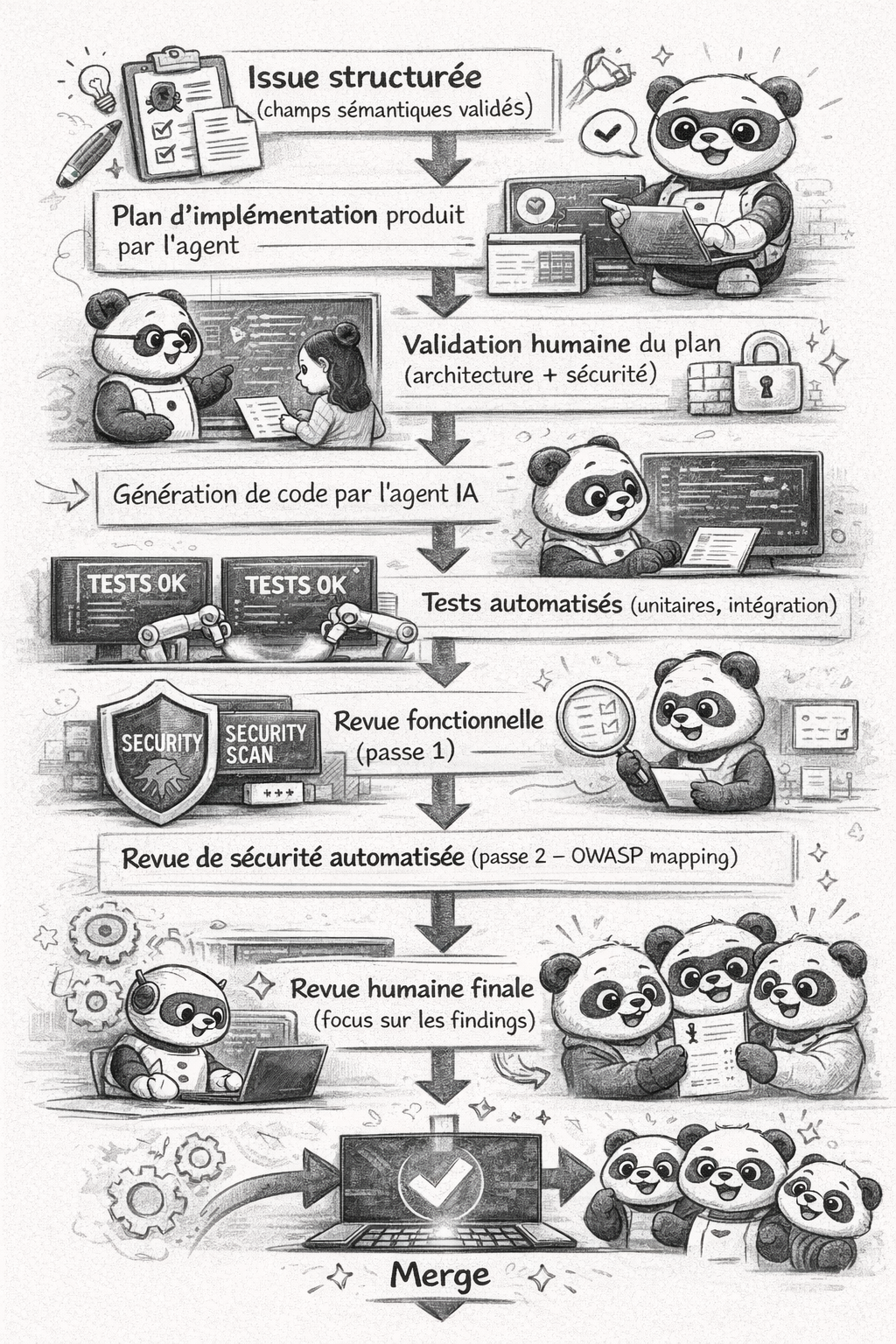
This workflow works whether your team uses Claude Code, GitHub Copilot in agent mode, Cursor, Windsurf, or an orchestrated pipeline with LangChain/LlamaIndex. The artefacts (issue templates, PLANNING_TEMPLATE, security review prompt) are contracts between humans and machines, not tool-specific configurations.
Key takeaways
Further reading
- OWASP Top 10 — the reference for vulnerability mapping in security review
- OWASP Application Security Verification Standard (ASVS) — for structuring security requirements in issues
- OWASP DevSecOps Guideline — reference for integrating security into CI/CD pipelines
- OWASP LLM Top 10 — specific risks of LLMs in the development pipeline
- Semgrep — static analysis integrable in pre-commit
- Gitleaks — secret detection in diffs before commit